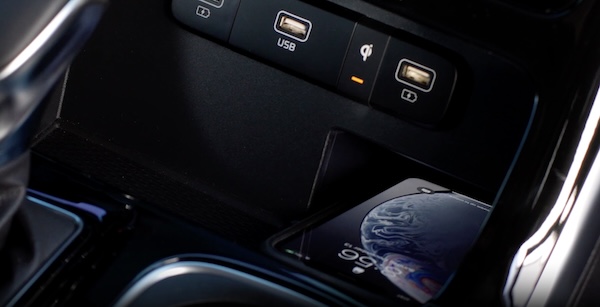
WIRELESS SMARTPHONE CHARGING SYSTEM*

Charge a compatible Qi™ Certified smartphone wirelessly by placing it on the charging pad at the front of the console, near the Multimedia USB ports and the charging indicator, while the ignition is on.

To enable and use:
  1. Enable Wireless Charging in the Vehicle Settings on the Infotainment System. Press the SETUP button, VEHICLE to enter Vehicle Settings, CONVENIENCE then select WIRELESS CHARGING SYSTEM FOR MOBILE DEVICES
  2. Place a compatible smartphone on the center of the charging pad
  3. Indicator light may change to amber once the wireless charging begins
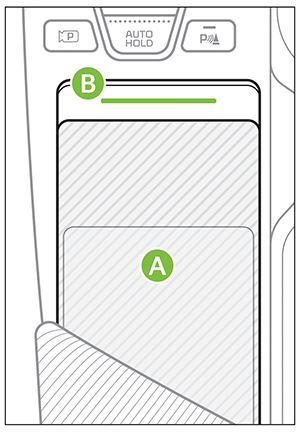
  4. Once charging is complete, the amber light may change to green

Requires Qi™ enabled device or Qi™ enabled case

Quick Tips:

  • The smartphone must be a compatible phone with Qi™ function available
  • Wireless charging must be enabled in Vehicle Settings
  • If wireless charging does not work, move smartphone around the pad until the charging indicator turns amber. Avoid placing other metal items in the bin while charging so as to not to impede the charging area
  • Removing the phone case may improve charging efficiency and ensure a secure connection
  • For wireless charging to occur, all doors (excluding rear hatch) must be closed and the Smart Key Fob must be detected inside the vehicle and the driver’s seat belt must be on

Reminders:

  • Some smartphone models are not Qi™ certified, which may effect the speed or performance of the wireless charging
  • Wireless charging technology allows for a device to be charged using inductive charging. See your Owner’s Manual for more detailed information and the back page for legal disclaimers
  • The wireless charger uses inductive charging, which is less efficient than conventional charging through a cable
  • Charging Performance: The position of your device on the wireless charging pad can affect how efficiently it charges. Performance may also be reduced by foreign objects (such as coins or pens) or thick phone cases
  • Smartphone Temperature: If you use certain smartphone applications while charging, your phone’s self-heating system may activate, which can affect charging speed or performance
  • Charging Interruption: Wireless charging will automatically stop if any door is opened or if there are foreign objects on the charging pad

*See LEGAL page for legal information

Refer to the section 4 in the Owner’s Manual for warnings and instructions. Button configuration may vary. Images are for illustrative purposes only and may not reflect actual feature or operation

