Bluetooth® Wireless Technology*

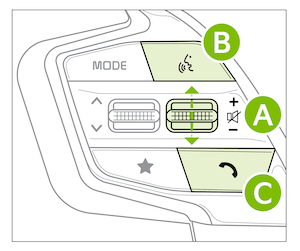
 Volume button: Press up/down to raise/lower speaker volume
Mute button: Press in to mute the microphone during a call
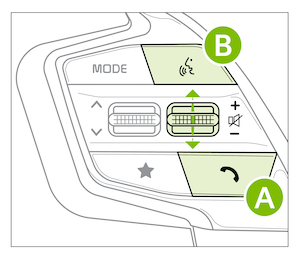
 Voice Recognition button: Press to activate voice recognition/bring up menus/place calls with minimal voice command prompts from the system. Press and hold to exit voice recognition. When enrolled with a Kia Connect* subscription, press this button to activate the Kia Connect Assist to use navigation guidance and search destinations
 Call / End button: Press to receive/place calls. In vehicles with navigation, if no phone is paired, press button to pair a phone
Pairing a Phone:
For instructions on how to pair a phone, refer to the Car Multimedia System User’s Manual or your vehicle’s Quick Start Guide.
How to Place a Call:
There are two options for placing a call:
(displays the phone screen with call history). Then say the command “Call {name}” or “Dial {number}” followed by contact name or numberVoice Recognition & Phone Contact Tips:
The system may have difficulty understanding some accents or uncommon names. Improve the performance by making a few simple changes to your phone contacts, listed below. To help optimize the Bluetooth® Wireless Technology Voice Recognition system, see other tips and reminders under Quick Tips (also see video link above).
*See LEGAL page for legal information.
-
Bluetooth® wireless Technology audio and calling functions are supported when connected to a Bluetooth® enabled device (sold separately).
-
Your vehicle’s steering wheel buttons may differ from those in the illustrations. See your Owner’s Manual for more details.
-
Driving while distracted is dangerous and should be avoided. Drivers should remain attentive to driving and always exercise caution when using the steering-wheel-mounted controls while driving.
-
For more information, refer to the Car Infotainment System Quick Reference Guide. For Bluetooth® Wireless Technology FAQs, go to www.kia.com, Owners section, or call Consumer Information for Bluetooth® Technology at (800) 333-4KIA. Refer to your Owner’s Manual for more specific Bluetooth® Wireless Technology phone pairing and operation instructions.

