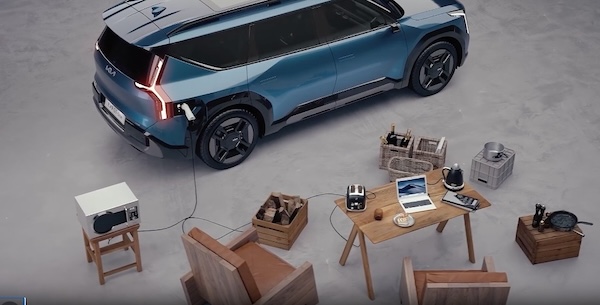
EV Charge Transfer / Vehicle to Load (V2L)
EV Charge Transfer / Vehicle to Load (V2L) allows you to use the vehicle’s high voltage battery to power electrical devices like home appliances or other electronic devices. V2L can also be used to charge items like electric bikes or another electric vehicle.
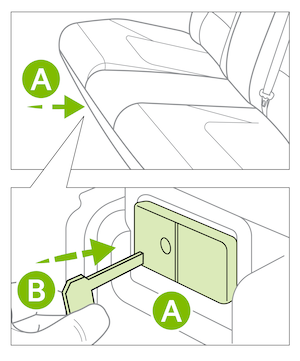
If equipped, there are two ports in the interior and exterior. The interior port  is under the rear seat and the other is the charging port for your EV.
If your EV’s high-voltage battery discharges to the limit set, the system will automatically stop supply to the ports. You can set your EV’s battery discharge limit from the EV screen. From the Infotainment System home screen, press the EV button. Then press EV Charge Transfer.
Interior Port - The EV Power button needs to be on to operate the port. Use the Smart Key fob mechanical key to unlock the power outlet cover  . Check the indicators on the port to ensure power is on.
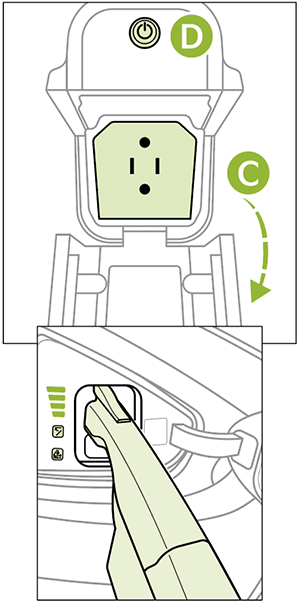
Exterior Port - Open the cover of the V2L connector  and connect your appliance or electronic device. Connect the V2L connector to the charging inlet on the EV, and press the button
  on the connector.
This feature may not be available on all Kia models.
Refer to section 1 in the Owner’s Manual for more information. These illustrations are for demonstration purposes only. Some items may appear different or vary in illustrations.

