Rear Cross-traffic Collision-Avoidance Assist (RCCA)

Rear Cross-traffic Collision-Avoidance Assist is designed to detect vehicles approaching from the rear left or right while the vehicle is backing up. RCCA warns the driver of a possible collision with a warning message and a warning sound. Also, RCCA may assist with braking to help avoid a collision.
When the rear-corner radar sensors detect approaching vehicles from the rear left or rear right side of the vehicle  , RCCA will sound a warning, the warning indicators on the outside rearview mirror will illuminate and a message will appear on the Instrument Cluster
  and the Infotainment System.
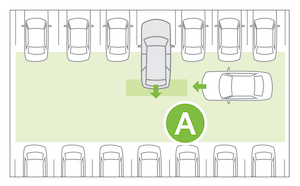
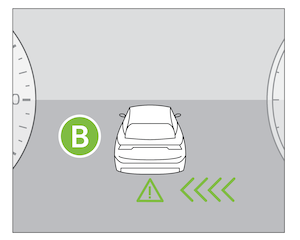
If RCCA detects that the collision risk has increased, RCCA automatically applies the brakes to reduce your speed, potentially helping to minimize the effects of a possible collision.
RCCA is designed to operate under the following conditions:
- When the gear shift is in Reverse
- When the vehicle is moving slower than 5 mph
- RCCA can be turned on/off by going to the User Settings*
 in the Instrument Cluster or the Vehicle Settings* in the Infotainment System
 - Only adjust settings when the vehicle is at a standstill, gear shift is in Park and the ignition is on or the Power button is in the on position
- **To access User settings* **in the Instrument Cluster - Press the MODE button
 (below) on the Steering Wheel to toggle to User Settings Press the OK up/down to toggle to Driver Assistance, then Parking Safety. Select Rear Cross-traffic Safety and press the OK button
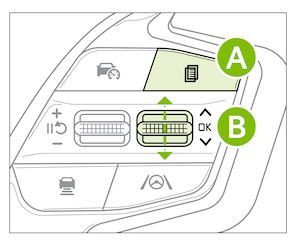
- To access Vehicle settings* in the Infotainment System – Press the SETUP key or the onscreen SETUP button. Press VEHICLE to enter Vehicle Settings. Select Driver Assistance, then Parking Safety and select Rear Cross-traffic Safety
Quick Tips:
- To adjust the WARNING VOLUME: Press the SETUP button to go to VEHICLE SETTINGS on the Infotainment System. Press VEHICLE, DRIVER ASSISTANCE, and under WARNING METHODS, you can adjust WARNING VOLUME, and turn HAPTIC WARNING on or off
- Adjusting the Warning Volume will adjust settings for other driver assistance systems
Reminders:
- When vehicle power is cycled, RCCA will remain in the previous state
- When a vehicle is approaching within the sensing range, and traveling faster than 3 mph, the RCCA system will show a warning
*See LEGAL page for legal information
When engaged, RCCA is a supplemental system. Do not solely rely on this system and always pay attention to the road and its conditions. Images are for illustration purposes only and may not reflect actual operation. Refer to section 7 in the Owner’s Manual for more information.

