
Remote Smart Parking Assist (RSPA)
Remote Smart Parking Assist uses the vehicle sensors to help park and exit parking spaces remotely from inside or outside the vehicle.
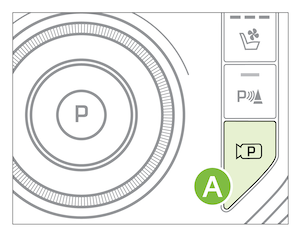
To park with Smart Parking (from inside the vehicle):
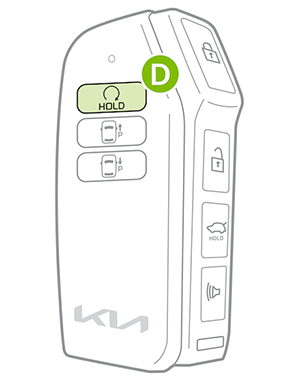
 to turn on Remote Smart Parking Assistfor RSPA to operate and park the vehicle – hold the button until the vehicle has finished parking. The transmission will automatically shift into Park and the parking brake will be engaged
To park and exit with Remote Parking (from outside the vehicle), you will use the Smart Key:
(above). Select REMOTE on the Infotainment System screen. When the message UNDER REMOTE CONTROL appears, exit the vehicle with the Smart Key on hand. Ensure all doors are closed or Backward
  button on the Smart Key (below), depending on how you want to park, and the vehicle will move in the direction of whichever button you press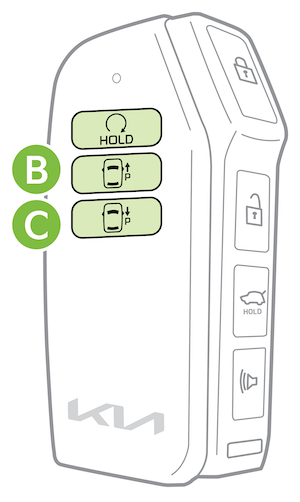
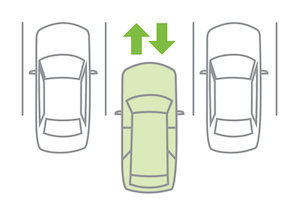
— There is a parking space open, with a vehicle on one side only
— When trying to park in a diagonal space
— When the parking space is too narrow or near a wall
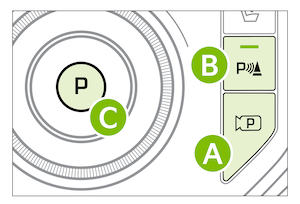
To turn off RSPA at any point while it’s operating, press the Parking View button (below) or Parking Safety button , press the Park button on the Rotary Dial Shifter or press the Remote Start button  on the Smart Key.
*See LEGAL page for legal information.
Images are for illustrative purposes only and may not reflect actual feature or operation. Refer to section 7 in the Owner’s Manual for more information.

