
Smart Cruise Control (SCC)
Smart Cruise Control is designed to maintain a predetermined distance from vehicles detected ahead by automatically adjusting the driving speed as needed. When traffic is detected, the vehicle will automatically slow to maintain a set distance from traffic without depressing the accelerator or brake pedal.
With SCC on and activated, and the vehicle distance set, it can bring the vehicle to a complete stop, when SCC detects a vehicle ahead slowing or stopping. When the vehicle ahead starts to move forward, SCC re-engages.
If the vehicle ahead stops for more than three seconds, press the accelerator pedal or press the +/- or buttons on the Steering Wheel to start moving the vehicle.
Smart Cruise Control will adjust acceleration based on the drive mode selected in the Drive Mode Integrated Control system.
Based on driving style*: SCC may also be able to operate based on the driver’s driving style, modifying for preferred vehicle distance, acceleration and reaction speed. To activate, in User Settings on the Instrument Cluster or Vehicle Settings on the Infotainment System, select Driver Assistance, Driving Convenience, Smart Cruise Control and then Based on Driving Style.
If your vehicle speed is between 0-20 mph when you press the Driving Assist button to turn SCC on, the set speed will be set to 20 mph.
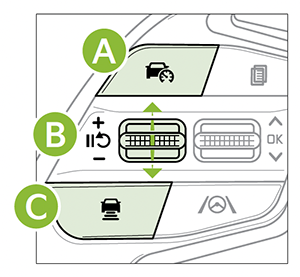
To set/adjust the set speed:
Press the Driving Assist button*  to turn SCC on and set the current speed (One-Touch Set). The SCC indicator will illuminate on the Instrument Cluster. SCC may decrease the speed to maintain the distance with the vehicle in front. Then press the +/- switch
  up/down to increase/decrease the set speed.
To set the vehicle distance:
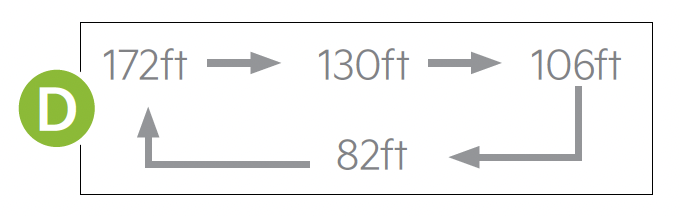
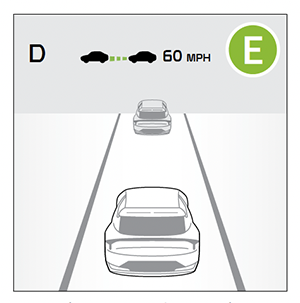
Press the Vehicle Distance button  on the steering wheel. The image on the LCD screen
  will change when scrolling through the settings. Each time the button is pressed, the vehicle distance changes
  .
.
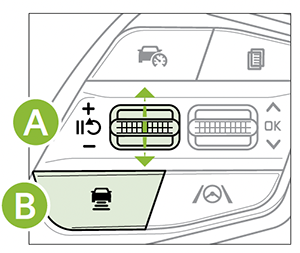
To pause/resume SCC operation: Press the Pause/Resume switch (below) . The SCC indicator on the Instrument Cluster will change.
To turn SCC off: Press the brake pedal, or press the Driving Assist button (below). The SCC indicator on the Instrument Cluster will turn OFF.
*See LEGAL page for legal information.
This feature may not be available on all Kia models.
When engaged, SCC is a supplemental function and is not a substitute for safe driving. It is the responsibility of the driver to always check the speed and distance to the vehicle ahead. See section 7 in the Owner’s Manual for more information.

