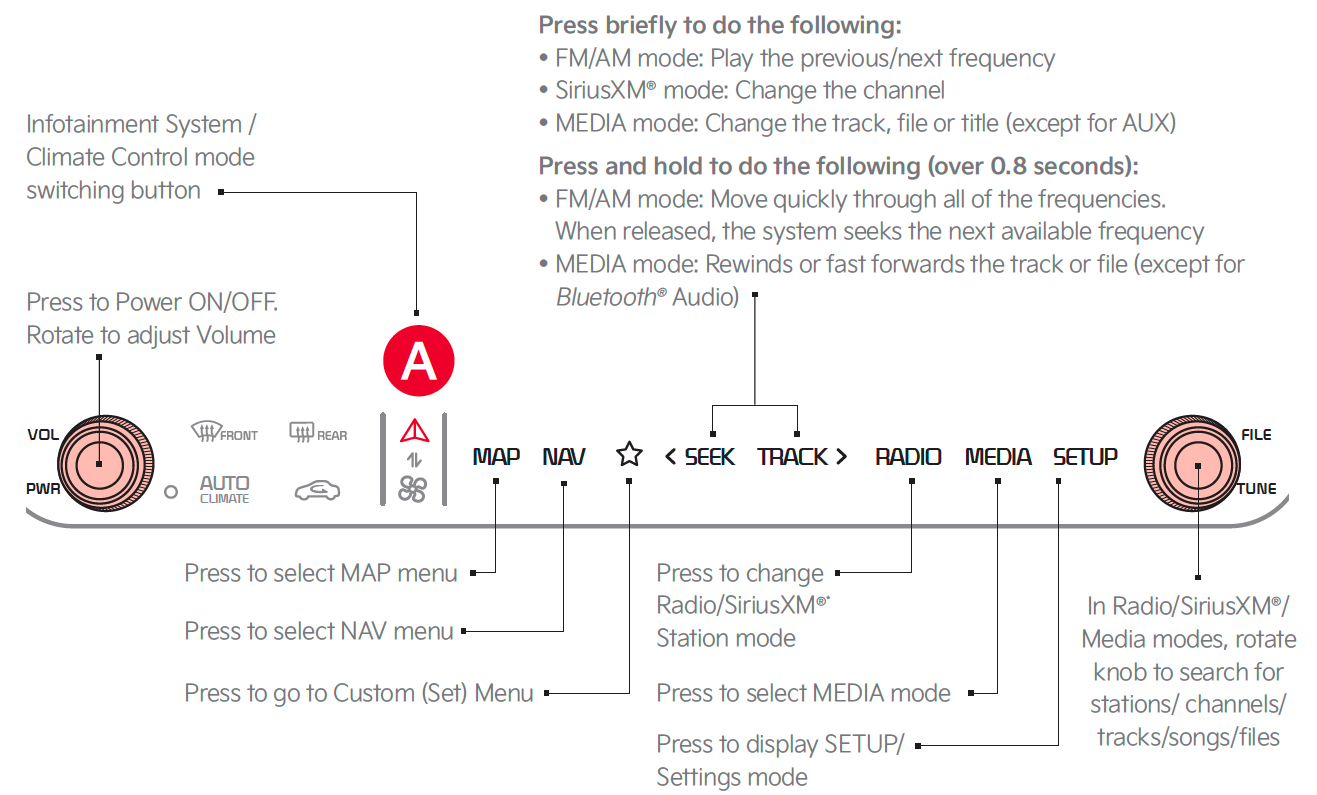
A/C & Infotainment System Switchable Controller

Press the Infotainment/climate control mode switching button  to toggle between Infotainment System and Climate Control Modes. Press and hold the Infotainment/climate control mode switching button to set the default button display mode.
To adjust the sound settings:
Press the STAR button next to or below the Radio Station display. This saves the current station as a preset.
In Radio mode, choose SiriusXM™, then select any of the first ten favorites, and during song or program play, tap the Skip Backward icon to start from the beginning of the song or program. Tap the Play Live icon to return to the live broadcast.
To program the Custom Key :
:
Driving while distracted is dangerous and should be avoided. Drivers should remain attentive to driving and always exercise caution when using the audio system controls while driving. To help minimize driver distraction, some audio system functionalities have been modified while the vehicle is in Drive, Reverse or moved out of Park.
*See LEGAL page for legal information
Certain features are available only on select Kia models.
Your vehicle’s audio system may differ from that in the illustration. For more information, refer to the Car Infotainment System Quick Reference Guide.
The system can register or pair multiple Bluetooth® devices. See the Car Infotainment System Quick Reference Guide for more information on setup and limitations.