Lane Keeping Assist (LKA)
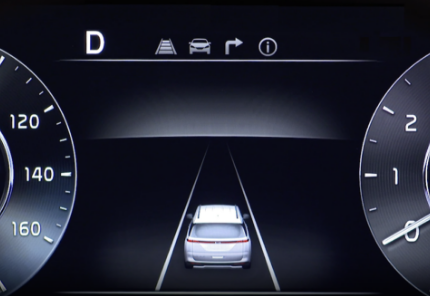
Lane Keeping Assist is designed to detect lane markings (or road edges) and can warn the driver if the vehicle leaves the lane without using the turn signal or may assist with steering to prevent the vehicle from departing from its lane. When turned on, the Instrument Cluster indicator  will initially illuminate gray. It will remain gray when the vehicle is traveling slower than 40 mph or when the system does not detect the lane markers. When LKA detects the lane markers and can assist with steering, the LKA icon will illuminate green.
If LKA detects that you are moving outside of your lane, LKA may provide steering assistance to prevent the vehicle from moving outside its lane. If the vehicle continues to move outside of the lane, LKA may give a warning sound and display Lane Departure Warning on the Instrument Cluster.
If the driver takes their hands off the Steering Wheel for several seconds, a warning message will appear on the Instrument Cluster.
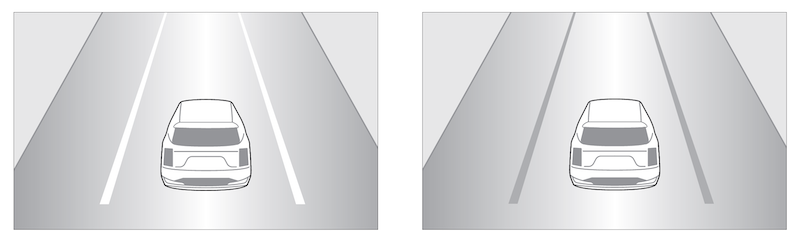
When LKA does not detect the lane markers, the lanes are displayed gray 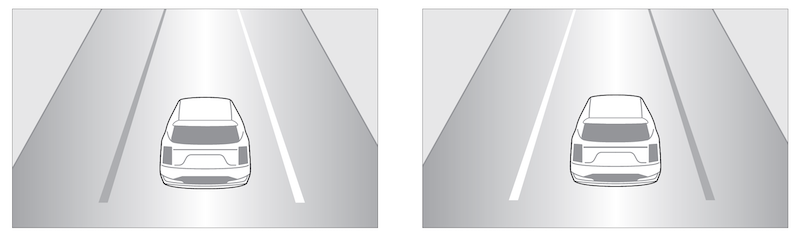
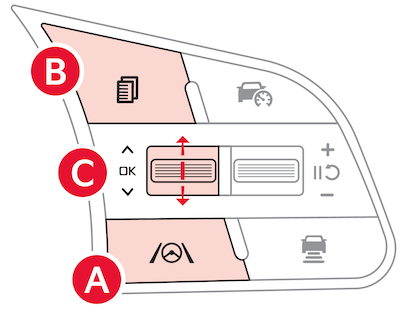
Press and hold the Lane Safety button  to turn LKA on or off when it is first enabled in User Settings in the Instrument Cluster or Vehicle Settings in the Infotainment System
Only adjust settings when the vehicle is at a standstill, gear shift is in Park and the ignition is on or the Engine Start/Stop button is in the ON position
To access User Settings in the Instrument Cluster -

 on the Steering Wheel to toggle to User Settings .
 up/down to toggle to Driver Assistance, Driving Safety and select Lane Safety
To access Vehicle settings in the Infotainment System –
*See LEGAL page for legal information
When engaged, Lane Keeping Assist is not a substitute for safe driving and may not always warn the driver if the vehicle is driven outside of its lane. Always drive safely and use caution.
Images are for illustrative purposes only and may not reflect actual feature or operation. Your actual display, buttons and/ or features may vary.
Actual Vehicle Settings steps may vary by model. Refer to section 5 in the Owner’s Manual for more information.