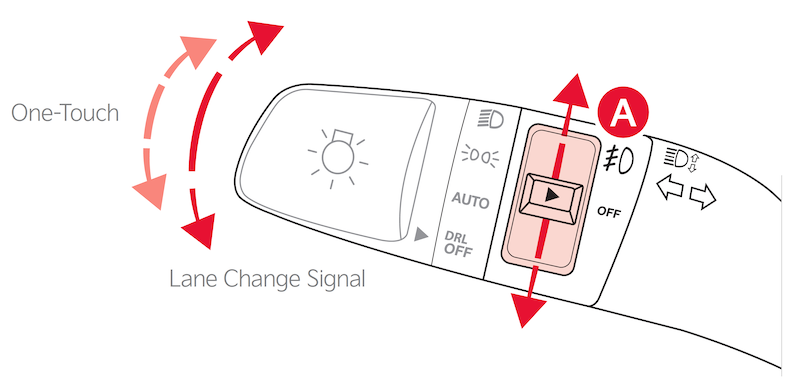
TURN SIGNALS & FOG LIGHTS
To operate:
- Turn Signals - Move lever Up/Down for Right/Left Turn Signal
- Fog Lights - Press switch
 up/down to turn Fog Lights on/off
To operate:
up/down to turn Fog Lights on/offOne-Touch Lane Change Signal is activated by briefly pressing the Turn Signal Lever up/down slightly for less than 1 second and then releasing. The lane change signal will blink 3 times.
Lane Change Signal Settings: To active/deactivate or change how many times the Lane Change Signal blinks (3/5/7), go to User Settings in the Instrument Cluster. Select LIGHTS and ONE TOUCH TURN SIGNAL. On some models, go to Vehicle Settings in the Infotainment System, press SETUP, VEHICLE, LIGHTS and ONE TOUCH TURN SIGNAL.
Headlights must be ON for Fog Light operation.
Images are for illustrative purposes only and may not reflect actual feature or operation.
This feature may not be available on all Kia models.
Button configuration may vary. Images are for illustrative purposes only and may not reflect actual feature or operation. Refer to section 4 in the Owner’s Manual for more information.