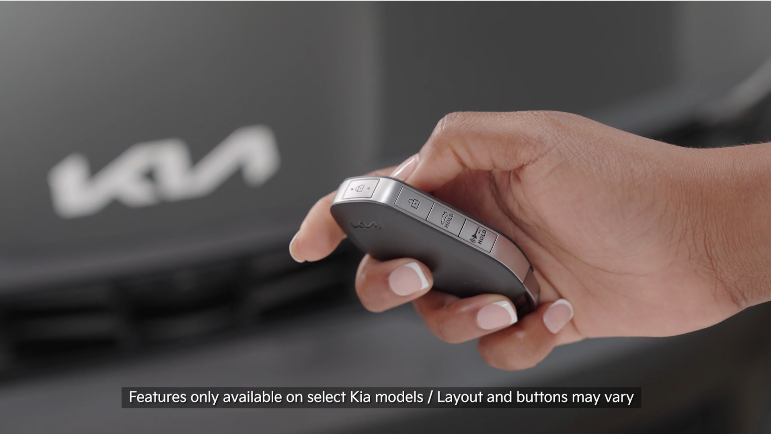
Smart Key & Mechanical key

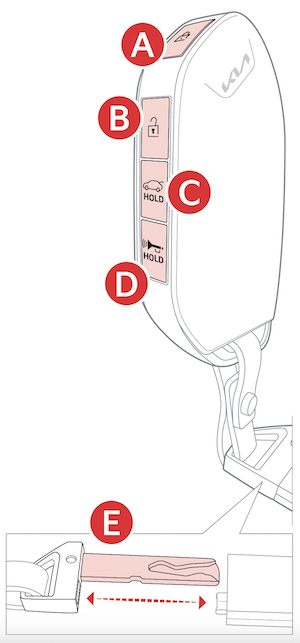
 Press to lock All Doors. Press twice within 2 seconds to sound the horn
 Press to unlock Driver’s Door. Press twice in 4 seconds to unlock All Doors
 Power Liftgate: Press and hold to unlock Liftgate
Manual Liftgate: Lift the Liftgate handle to manually open Liftgate
Power Liftgate: Press and hold to unlock Liftgate
Manual Liftgate: Lift the Liftgate handle to manually open Liftgate
 Press and hold for more than a one second for Panic Alarm. To turn off Alarm, press any button
 Mechanical Key:

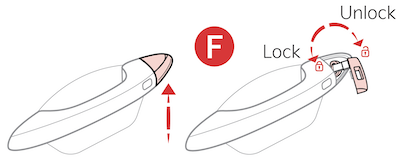
The Liftgate unlocks when the Smart Key fob is within close proximity of the vehicle Liftgate.
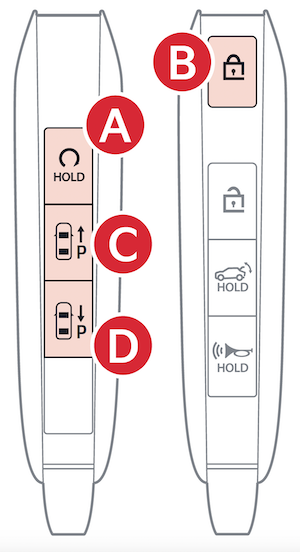
Remote Start*: Lock the doors by pressing the door lock button within 32 feet distance from the vehicle. Within four (4) seconds of pressing the door lock button press and hold the Remote Start button for more than two (2) seconds to start the vehicle. To stop the Remote Start operation, press the button again. If the driver does not enter vehicle within 3 minutes of starting the vehicle, the vehicle will automatically turn off.
REMOTE SMART PARKING ASSIST (RSPA):
To park or exit a parking space remotely use buttons and as needed. For more information, see your Owner’s Manual or scan the QR code.
One/two button turn logic can be changed in the Vehicle Settings in the Infotainment System
*See LEGAL page for legal information
Certain features are available on select Kia models.
Remote button configuration may vary depending on vehicle options. For more information on the Mechanical Key, please refer to section 4 in the Owner’s Manual. Do not use remote climate control or remote start if vehicle is in an enclosed area (e.g., closed garage) or a partially enclosed area without ventilation. Close all doors leading from adjacent living areas to the vehicle area before executing a remote climate control or remote start command.

