
Steering Wheel Controls
The Trip Computer is a driver information system that displays information related to driving. The ignition switch or the Engine Start/Stop button* must be in the ON position for the information to display.
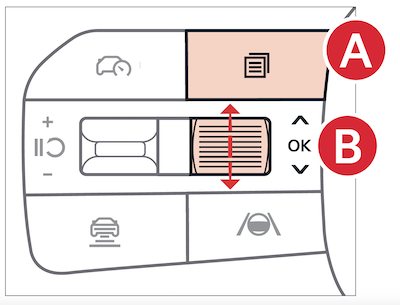
To cycle through the different Instrument Cluster modes, press the Mode button
 . When in Trip Computer mode
 , press the OK button
  up/down to cycle through the screens
  .
.
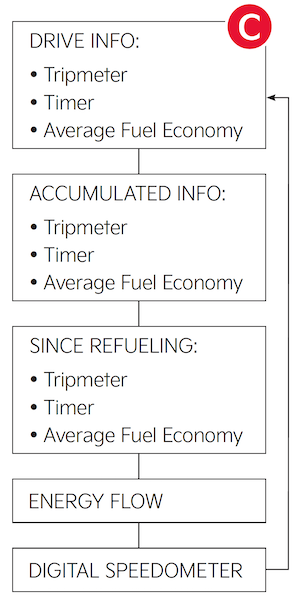
When displaying trip information or the fuel economy screens, press and hold the OK button to reset the Trip distance to zero.
Driving while distracted is dangerous and should be avoided. Drivers should remain attentive to driving and always exercise caution when using the steering-wheel-mounted controls while driving.
Your vehicle’s steering wheel buttons may differ from those in the illustrations.
Refer to section 5 in the Owner’s Manual for more information.

