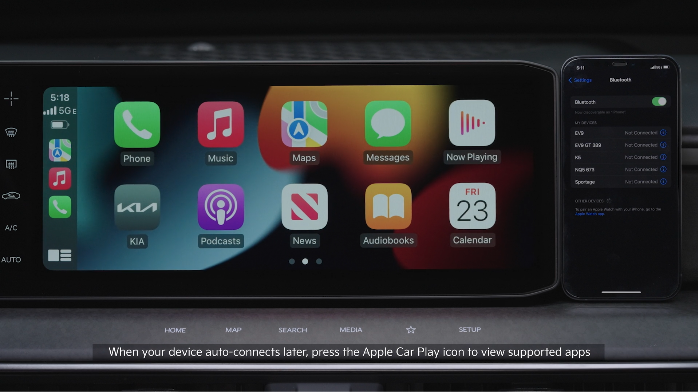
APPLE CARPLAY®* SETUP

Wireless Connection setup for Apple CarPlay®:

  1. On the Infotainment System home screen, press SETUP
  2. Press DEVICE CONNECTIONS
  3. And DEVICE CONNECTIONS again
  4. Press ADD NEW
  5. On your smartphone, turn WiFi and Bluetooth® on, and select the Vehicle Name that’s on the Infotainment System screen
  6. Confirm the verification code
  7. When connecting to Apple CarPlay® for the first time, check the pop-up window displayed on the Infotainment System screen and press YES. 
  8. On the smartphone, agree to Enable Apple CarPlay®
  9. Go to the Infotainment System home screen and select Apple CarPlay® to see the Apple CarPlay® supported apps
Cable Connection setup for Apple CarPlay®:
  1. Connect the Apple CarPlay® compatible iPhone® with the vehicle’s USB port using the manufacturer’s cable provided with your iPhone®
  2. Press the SETUP button on the Infotainment System
  3. Press DEVICE CONNECTION on the screen and select Apple CarPlay®
  4. Select ENABLE APPLE CARPLAY. Review all terms, conditions and requests on the head unit and phone, and, if you agree, accept them in order to use Apple CarPlay®
  5. From the Infotainment System home screen, select the Apple CarPlay® button, where you’ll see all the Apple CarPlay® supported apps

Quick Tips:

If Apple CarPlay® randomly disconnects:

  • Ensure the USB cable is certified by the phone manufacturer for both power and data
  • Clean the phone’s port, which the USB cable connects to, as instructed by the phone’s manufacturer
  • The phone should not be disturbed while driving as this can cause a disconnection at the phone’s USB port
  • Visit the Apple CarPlay® website for Apple CarPlay® app concerns

Reminders:

  • Apple CarPlay® compatibility requirements for connection: iOS® software 8.0 or higher, phone manufacturer’s USB cable and data plan for applicable feature(s)
  • Always update your phone to the latest operating system release

*See LEGAL page for legal information.

Refer to the Car Infotainment System Quick Reference Guide for more information.

Android Auto™ and Apple CarPlay® run on your smartphone cellular data service. Normal data rates will apply.

Driving while distracted can result in a loss of vehicle control that may lead to an accident, severe bodily injury, and death. The driver’s primary responsibility is in the safe and legal operation of a vehicle, and any handheld devices, other equipment, or vehicle systems which take the driver’s eyes, attention and focus away from the safe operation of a vehicle or which are not permissible by law should never be used during operation of the vehicle.

