Steering Wheel Audio Controls
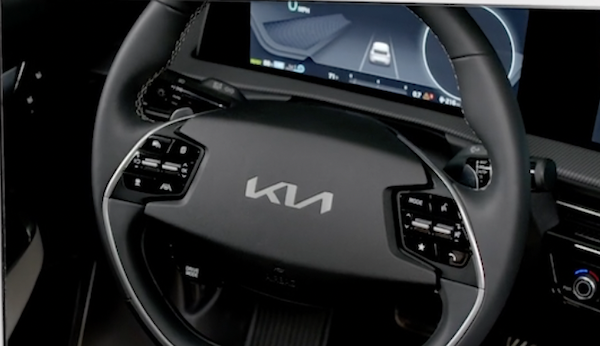

 Audio System MODE button: When system is on, press to cycle through the Radio Modes (FM/AM/SiriusXM®) or the Media Modes (USB/Bluetooth® Audio)
Audio System ON/OFF: Press and hold to go to Advanced Setting / Steering Wheel mode when the system is on
 Seek/Preset button:
Radio Mode (FM/AM/SiriusXM®*): Press up/down to advance through the preset stations. Press up/down and hold to auto seek
Media Modes: Press up/down to move track up/down. Press up/down and hold to fast forward/rewind (except for Bluetooth® Audio)
 Volume buttons: Press up/down arrows to raise/lower the volume
Mute button: Press to mute all audio (Media pauses in some Media modes when pressed)
 Custom button
  : Press to access the user-selected feature. Press and hold to program the Custom Button, then select an available feature you would like the Custom Button to open
*See LEGAL page for legal information
Certain features are available only on select Kia models.
Your vehicle’s steering wheel buttons may differ from those in the images.
Driving while distracted is dangerous and should be avoided. Drivers should remain attentive to driving and always exercise caution when using the steering-wheel-mounted controls while driving.
To help minimize driver distraction, some audio system functionalities have been modified while the vehicle is in Drive, Reverse or moved out of Park.
For more information, refer to the Car Infotainment System Quick Reference Guide

