Wireless Smartphone Charging System
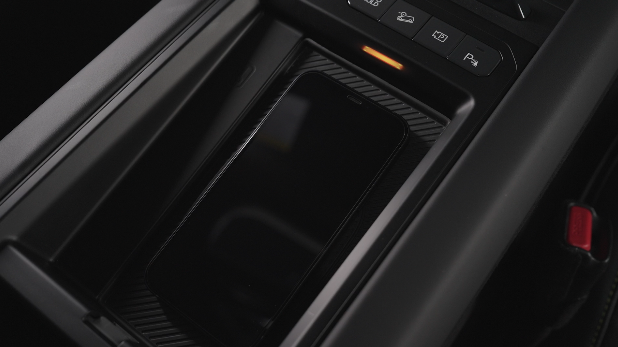
WIRELESS SMARTPHONE CHARGING SYSTEM*
Charge a compatible Qi™ Certified smartphone wirelessly by placing it on the charging pad  at the front of the console, near the Multimedia USB ports and the charging indicator, while the ignition is on.
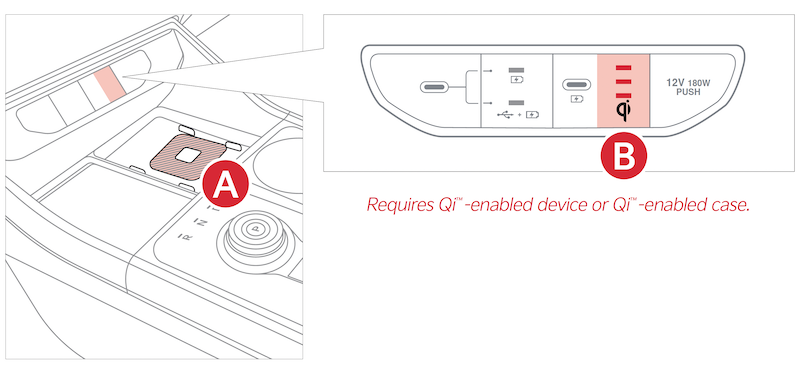
- Enable Wireless Smartphone Charging System in the Vehicle Settings in the Infotainment System, select VEHICLE, CONVENIENCE then WIRELESS SMARTPHONE CHARGING SYSTEM
- Place a compatible smartphone on the center of the charging pad
- The indicator lights
 may change to amber once the wireless charging begins
 - Once charging is complete, the amber light may change to green
Quick Tips:
- The smartphone must be a Qi™ certified compatible smartphone with Qi™ function available. Some smartphone models are not Qi™ certified, which may affect the availability, speed or performance of the wireless charging
- Wireless charging must be enabled in vehicle settings
- If wireless charging does not work, move the smartphone around the pad until the charging indicator turns amber. Avoid placing other metal items in the bin while charging as to not impede the charging area
- For wireless charging to occur, all doors (excluding rear hatch) must be closed & the Smart Key Fob must be detected inside the vehicle
- Removing the phone case may improve charging efficiency and ensure a secure connection
Reminders:
- Avoid placing other metal items in the bin while charging as to not impede the charging area
- This vehicle is equipped with wireless charging technology which allows for a device to be charged using inductive charging; however, device compatibility varies
- The wireless charger uses inductive charging, which is less efficient than conventional charging through a cable
- Charging Performance: The position of your device on the wireless charging pad can affect how efficiently it charges. Performance may also be reduced by foreign objects (such as coins or pens) or thick phone cases
- **Smartphone Temperature: **If you use certain smartphone applications while charging, your phone’s self-heating system may activate, which can affect charging speed or performance
- Charging Interruption: Wireless charging will automatically stop if any door is opened or if there are foreign objects on the charging pad
*See LEGAL page for legal information
Certain features are available only on select Kia models.
Button configuration may vary. Images are for illustrative purposes only and may not reflect actual feature or operation.
Refer to section 7 in the Owner’s Manual for more information.

