Android Auto Setup
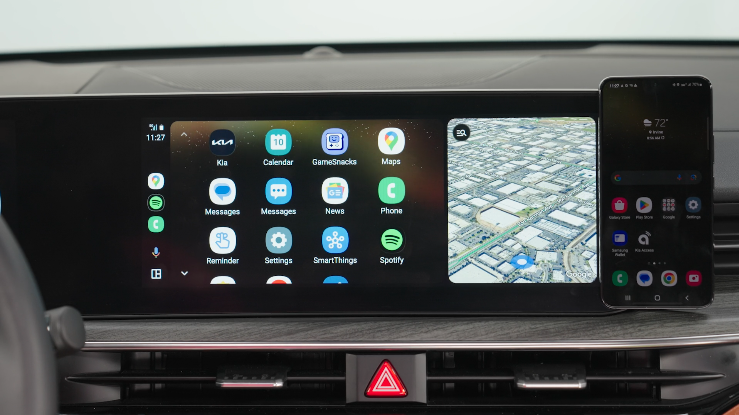
Android Auto™ compatible smartphone setup: Download the Android Auto™ app from the Google Play™ Store. Open the Android Auto™ app and proceed with the onscreen instructions to complete setup on the mobile device.
Cable Connection setup for Android Auto™:
- Press the SETUP key on the Infotainment System
- Press Device Connection, select Phone Projection Settings, Android Auto, then select Enable Android Auto. Review all terms, conditions and requests on the Infotainment System and phone. If you agree, accept them in order to use Android Auto™
- Connect the Android™ device with the vehicle’s USB port using the manufacturer’s cable provided with your phone
- From the Infotainment System home screen, select the Android Auto™ button, where you’ll see all the Android Auto™ supported apps
Quick Tips:
If Android Auto™ randomly disconnects:
- Ensure the USB cable is certified by the phone manufacturer for both power and data
- Clean the phone’s port, which the USB cable connects to, with disposable compressed air
- The phone should not be disturbed while driving as this can cause a disconnection at the phone’s USB port
- Visit the phone manufacturer’s website for Android Auto™ concerns
Reminders:
Android Auto™ compatibility requirements for connection:
– Kia Connect with Navigation* (USB cable & wireless connection):
OS Android™ 5.0 or higher, phone manufacturer’s USB cable and data plan for applicable feature(s)
– USB cable connection - OS Android™ 5.0 or higher, phone manufacturer’s USB cable and data plan for applicable feature(s)
– Wireless connection - OS Android™ 9.0 or higher with data plan for applicable feature(s)
- It is recommended to always update your phone to the latest operating system release
- Wireless Android Auto™ system only works for certain Android™ models. Use the manufacturer’s USB cable when wireless feature is not available
*See LEGAL page for legal information.
Driving while distracted is dangerous and should be avoided. Drivers should remain attentive to driving and always exercise caution when using the steering-wheel-mounted controls while driving. For illustrative purposes only. Your actual display, buttons and/or features may vary.
For Bluetooth® Wireless Technology FAQs, go to www.kia.com, or call Consumer Information for Bluetooth® Technology at (800) 333-4KIA. Refer to the Car Infotainment System Quick Reference
Guide for more specific Bluetooth® Wireless Technology phone pairing and operation instructions.

