EV Mode - Infotainment System
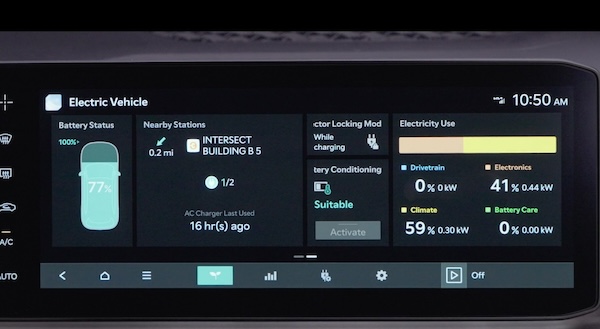
EV Mode on the Infotainment System screen allows you to navigate several menus that include information on available range, energy information, next departure setting, charging and climate info, vehicle-to-load (V2L) setting, nearby charging stations and EV settings.
To go to EV Mode, swipe the Home screen to see the menu buttons. Press EV Menu to enter EV Mode.

 Available Range - Displays the estimated available driving distance according to the vehicle’s current location and charge amount. The first distance is with the Climate Control on. The second is with the Climate Control off.
The estimated range is based on a number of factors and assumes optimal driving conditions and efficient driving habits. Actual range will vary with options, driving conditions, driving habits, vehicle maintenance, charging practice, battery age, weather, temperature and your vehicle’s condition. Battery capacity will decrease with time and use. For more information on range, please see www.fueleconomy.gov

 Energy Information – Displays battery charge information and energy consumption history
 Nearby charging stations - Tap the icon to search for nearby charging stations or stations along your route
 Reserved charging - Includes the following settings:
- Next departure: Set the anticipated departure date and time for the next scheduled charge
- Scheduled charging and target temperature: Set the date and time of your next battery charge and the target climate control temperature
- Vehicle to Load (V2L): Enable the V2L system and adjust usage settings
Certain features are available only on select Kia models.
See section 7 of the Owner’s Manual or the Car Infotainment System’s Quick Reference Guide for more detailed information on screens.
Illustration is for demonstration purposes only. Some items may appear different or vary in illustrations.

