EV Power Button

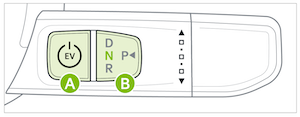
To start the vehicle (DRIVE READY mode):
1. Depress the brake pedal
2. Press the EV Power button  while Gear Shift is in Park
To turn the vehicle power OFF, press the P (Park) button, press on the brake pedal and press the EV Power button.
To use the EV Power button, you must have the Smart Key in the vehicle.
- OFF - The vehicle is off
- ACCESSORY - The vehicle is in accessory position. Limited functions are available (press once without pressing the brake pedal)
- POWER ON - Some vehicle functions are on. Warning lights can be checked (press a second time, without pressing the brake pedal)
- DRIVE READY - The READY indicator will illuminate and the vehicle is ready to drive
Quick Tips:
To use electrical accessories:
- Accessory mode - When in the OFF position and without depressing the brake pedal, press the EV Power button once
- POWER ON mode - When already in the accessory mode and without depressing the brake pedal, press the EV Power button again.
- When in the OFF position (not illuminated) and without depressing the brake pedal, press the EV Power button twice
Reminders:
- In an emergency situation while the vehicle is in motion, you are able to turn the vehicle off and to the ACC position by pressing the EV Power button for more than 2 seconds or 3 times consecutively within 3 seconds
- If the battery is weak or the smart key is not working properly, check that the shift lever is in the P (Park) position. Place the Smart Key on the key recognition area located on the center console, and then press the EV Power button for about 10 seconds in the accessory state. With the vehicle in the off position, restart the vehicle
- Do not turn the vehicle off by pushing the EV Power button while the vehicle is in motion. If the vehicle has been turned off, the power brake and power steering system cannot operate
- With the vehicle off, hydraulic power assist for steering and braking will be disabled and the vehicle will be more difficult to control
*See LEGAL page for legal information. Certain features are available only on select Kia models.
Button configuration may vary. Images are for illustrative purposes only and may not reflect actual feature or operation.
Driving while distracted is dangerous and should be avoided. Do not attempt to change vehicle system settings while driving.
For more information, refer to section 9 in the Owner’s Manual.

