Navigation-based Smart Cruise Control (NSCC)

While Smart Cruise Control is operating, Navigation-based Smart Cruise Control may automatically adjust vehicle speed when driving on certain highways by using road information from the navigation system.
To turn on NSCC, go to the Vehicle Settings in the Infotainment System, select Driver Assistance, Driving Convenience, and Auto Highway Speed Change.
When SCC is on and operating, the vehicle is driving on limited/controlled access highways and NSCC is turned on, then NSCC is enabled and the NAV icon  will illuminate green on the Instrument Cluster
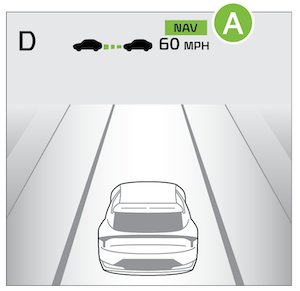

When NSCC detects a curve ahead  , and NSCC activates and reduces the vehicle speed, the NAV icon
  will blink. When the vehicle passes the curved road, the vehicle may return to its previously set SCC speed.
If Smart Cruise Control is temporarily unavailable due to a pause or rerouting, a gray NAV indicator will appear on the cluster. When the accelerator pedal is pressed, a white (NAV) indicator will blink on the cluster.
Reminders:
- NSCC is only available on certain controlled access roads and highways.
*See LEGAL page for legal information
This feature may not be available on all Kia models. See section 10 in the Owner’s Manual for more information.
For more setting information, refer to the Car Infotainment System Quick Reference Guide.
NSCC and Cruise Control are supplemental systems and are not substitutes for safe driving.
It is the responsibility of the driver to always check the speed and distance to the vehicle ahead.
Images are for illustrative purposes only and may not reflect actual feature or operation.

