Smart Cruise Control (SCC)
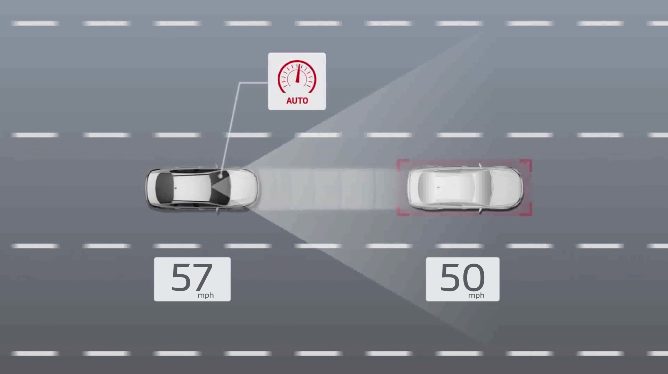

Smart Cruise Control is designed to maintain a predetermined distance from vehicles detected ahead by automatically adjusting the driving speed in certain circumstances.
When traffic is detected, the vehicle is designed to automatically slow to maintain a set distance from traffic without depressing the accelerator or brake pedal. If SCC detects that the driver is attempting to overtake a vehicle in front, SCC may help by assisting acceleration.
The Based On Driving Style function* allows SCC to operate based on how you drive, taking into account distance between vehicles, acceleration and reaction speed.
When SCC is on and activated, the vehicle distance set, and the system detects a vehicle slowing or stopping, SCC may bring the vehicle to a complete stop.
When the vehicle ahead starts to move forward, SCC re-engages. If the vehicle ahead stops for more than 3 seconds, the accelerator pedal or the  button
  must be pressed to start moving the vehicle.
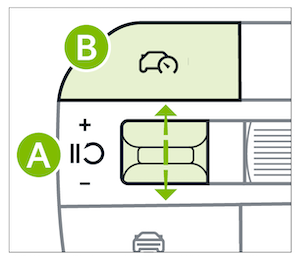
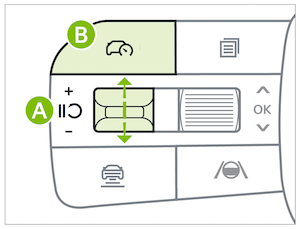
Press the Driving Assist button  to turn the system ON and set to the current vehicle speed (One-Touch Set). The cruise indicator will illuminate on the Instrument Cluster. SCC may decrease the speed to maintain the distance with the vehicle in front.
• Increase speed: Press the switch up to increase the set vehicle speed
• Decrease speed: Press the switch down to decrease the set vehicle speed
• The indicator light, set speed and vehicle distance will illuminate on the Instrument Panel screen 
When SCC is canceled, the icon will illuminate gray 
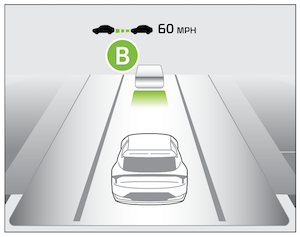
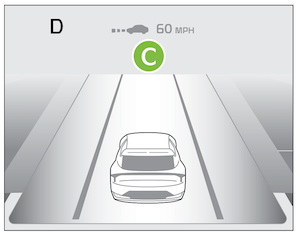
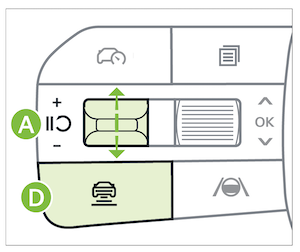
Press the Vehicle Distance button  on the steering wheel.
The image on the Instrument Cluster will change when scrolling through the settings.
Each time the button is pressed, the vehicle distance changes  .
.

Press the pause/resume switch . The SCC indicator on the Instrument Panel will turn OFF.
Press the Driving Assist button . The SCC indicator on the Instrument Panel will turn GRAY.
Go to Vehicle Settings in the Infotainment System by pressing the SETUP button. Go to VEHICLE, then DRIVER ASSISTANCE, then DRIVING CONVENIENCE and SMART CRUISE CONTROL. Here, set the distance, acceleration and reaction speed or select BASED ON DRIVING STYLE*.
Quick Tips:
The speed setting for SCC can be adjusted under the following conditions:
- When following a vehicle, there is no minimum speed requirement
- If your vehicle speed is less than 20 mph, when SCC is turned on and activated, the vehicle speed will be set to 20 mph
- Always keep the front-view camera and front radar sensor areas clean and free from debris to maintain optimal performance
Reminders:
- The Smart Cruise Control system will not activate until the brake pedal has been depressed at least once after the ignition is ON or vehicle starts
- SCC is canceled when the driver’s door is opened, gear shift is changed out of D (Drive), EPB is activated and various other conditions. See the Owner’s Manual for other conditions
- If SCC is left on, it can be activated inadvertently. Keep the system off when not in use to avoid setting a speed that the driver is not aware of
- SCC may decelerate if it detects a surrounding vehicle moving into your lane
- SCC may not recognize unexpected and sudden situations or complex driving situations, so always pay attention to driving conditions and control your vehicle speed
*See LEGAL page for legal information.
This feature may not be available on all Kia models.
When engaged, the Smart Cruise Control system is not a substitute for safe driving and cruise-control procedures. This is not an auto-pilot feature. Always drive safely and use caution. The Smart Cruise Control system may not detect every object in front of the vehicle.
See section 10 in the Owner’s Manual for more information. Images are for illustrative purposes only and may not reflect actual feature or operation.

