Turn Signals
TURN SIGNALS & FOG LIGHTS
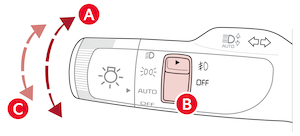
To operate:
- Turn Signals - Move lever Up/Down for Right/Left Turn Signal

- Fog Lights - Rotate switch
 up/down to turn Fog Lights ON/OFF
One-Touch Lane Change Signal
One-Touch Lane Change Signal is activated by briefly pressing the Turn Signal Lever slightly for less than 1 second and then releasing  . The lane change signal will blink 3 times.
To change how many times the Lane Change Signal blinks (3/5/7), on the Infotainment System, go to Vehicle Settings by pressing SETUP, VEHICLE, LIGHTS, and ONE TOUCH TURN SIGNAL.
Reminders:
Headlights must be ON for Fog Light operation.
This feature may not be available on all Kia models.
Button configuration may vary. Images are for illustrative purposes only and may not reflect actual feature or operation. Refer to section 4 in the Owner’s Manual for more information.

