Vehicle Settings - Infotainment System
VEHICLE SETTINGS - INFOTAINMENT SYSTEM
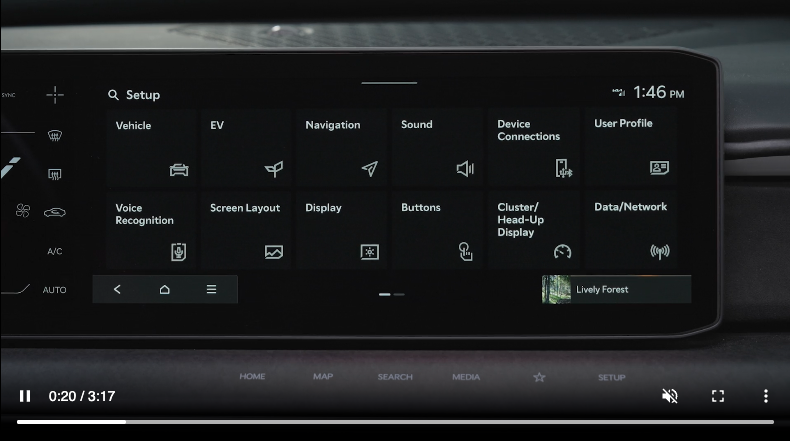
To enter the Vehicle Settings mode in the Infotainment System, press the SETUP key on the infotainment system. Then press the Vehicle icon  , which will take you to the Vehicle Settings. Use the touchscreen to navigate through the menus.
Vehicle Settings modes:
Driver Assistance:
- Driving Convenience
- Driver Attention Warning
- Driving safety
- Parking Safety
Drive Mode:
- My Drive Mode
- Drive Mode Change Alert
Active Sound Design:
- Off
- Smallest Change
- Moderate Change
- Largest Change
Climate:
- Recirculate Air
- Automatic Ventilation
- Climate Features
Seat:
- Link to Climate Settings
- Seating Easy Access
- Seat Position Change Alert
Lights:
- Ambient Light
- One-touch Turn Signal
- Welcome Mirror Light
- Headlight Delay
- Lighting Pattern
- Travel Mode
- High Beam Assist
- Intelligent High Beams
- Interior Light Always On
Doors:
- Automatically Lock/Unlock
- 2 Press Unlock
- Smart Trunk
Digital Keys:
- Smartphone Key
- NFC Card Key
- Digital Key Information
Convenience:
- Rear Occupant Alert
- Service Interval
- Oil Change Reminder
- Wireless Charging System
- Mobile Phone Wireless Charging Indicator
Certain features are available only on select Kia models.
Refer to the Car Infotainment System Quick Reference Guide for more information.

