Kia Connect Activation*

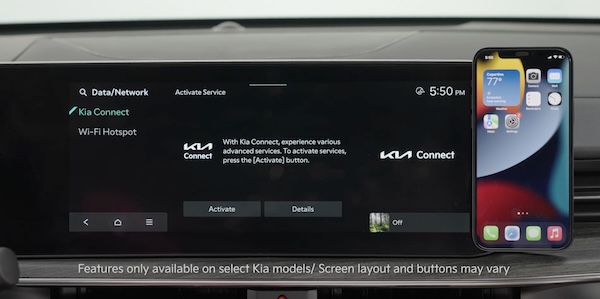

Follow these steps to activate your Kia Connect system:
- Enter the activation screen on your Infotainment System:a. Press the SETUP buttonb. Press the DATA/NETWORK buttonc. In Kia Connect, press ACTIVATE
Follow the instructions on the screen to proceed with activation, or the steps below:
- Read the Terms of Service and press AGREE
- Enter number or email address to receive a verification code, then press OK and SUBMIT
- Click on the link and a page will open requesting you to create an account or log in to your account; provide the information needed and select SAVE to create the account
- A page will open displaying your verification code. Enter this code on the Infotainment System screen. Press OK and SUBMIT, then press OK again
- On your phone, select I HAVE ENTERED MY VERIFICATION CODE and a link will be provided to download the Kia Access App*. After installing the app, log in and enjoy
Quick Tips:
If you already have a Kia Owners Portal account, you can use the same phone number or email that’s registered to that account. You will just need to enter the password prior to receiving the verification code.
Reminders:
This vehicle is equipped with over-the-air system updates.
*See LEGAL page for legal information
This feature may not be available on all Kia models.
Driving while distracted can result in a loss of vehicle control that may lead to an accident, severe bodily injury, and death. The driver’s primary responsibility is in the safe and legal operation of a vehicle, and any handheld devices, other equipment, or vehicle systems which take the driver’s eyes, attention and focus away from the safe operation of a vehicle or which are not permissible by law should never be used during operation of the vehicle.
For more information, refer to the Car Infotainment System Quick Reference Guide.

