Vehicle Settings - Infotainment System
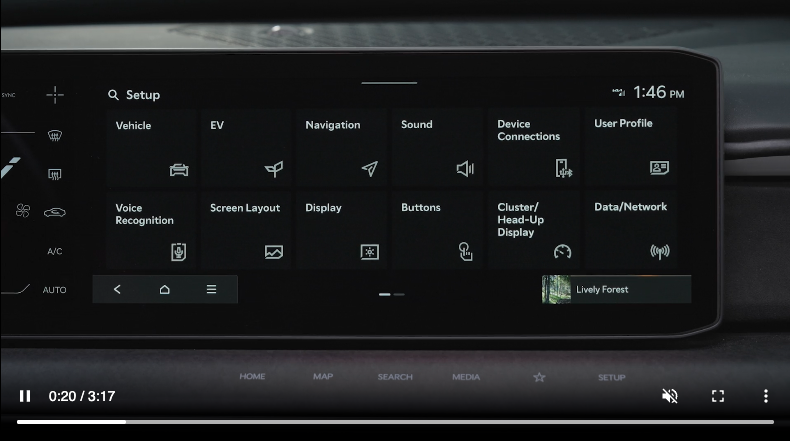
VEHICLE SETTINGS - INFOTAINMENT SYSTEM
To enter the Vehicle Settings mode in the Infotainment screen, press the SETUP key on the audio head unit or the SETUP icon on the Infotainment System screen. Then press the VEHICLE icon, which will take you to the Vehicle Settings screen. Use the touchscreen to navigate through the menus.
Vehicle Settings modes:
Driver Assistance:
- Driving Convenience
- Driving safety
- Speed Limit
- Warning Method
- Driver Attention Warning
- Parking Safety
Head-Up Display:
- Parking Safety
- Head-Up Display
- Display Control
- Content Selection
Cluster:
- Illumination
- Cluster Theme Selection
- Reset Fuel Economy
- Content Selection
- Welcome Sound
Lights:
- One-touch Turn Signal
- Headlight Delay
- High Beam assist
Door:
- Auto Lock
- Auto Unlock
- 2 Press Unlock
- Power Liftgate
- Power Liftgate Opening Speed
- Power Liftgate Opening Height
- Smart Liftgate
- Remote Window Control
Convenience:
- Rear Occupant Alert
- Service Interval
- Oil Change Reminder
- Wireless Charging System for Mobile Devices
- Auto Rear Wiper (in R)
- Vehicle Auto-Shut Off
Digital Keys:
- Smartphone Key
- NFC Card Key
- Digital Key Information
Reminders:
Some settings appear in User Settings in the Instrument Cluster.
Some settings in certain models may be available through User Settings in the Instrument Cluster LCD. See section 4 in the Owner’s Manual or the Car Infotainment System Quick Reference Guide.
Driving while distracted is dangerous and should be avoided. Do not attempt to change vehicle system settings while driving.

